About WindowsTechIt
WindowsTechIt is a practical troubleshooting and how-to blog covering everything Windows — from fixing everyday errors to optimizing your PC. The blog has been helping Windows users since the Windows 7 era and continues to publish up-to-date guides for Windows 10 and Windows 11.
The content spans a wide range of topics, including Windows Update errors and error code fixes, HDMI and display issues, audio and sound troubleshooting, driver problems, Bluetooth fixes, Microsoft Edge tips, Outlook and Office solutions, Xbox controller issues, and performance optimization. There are also dedicated guides for Xiaomi and Redmi device users, covering connectivity, Wi-Fi, and Android-specific fixes.
Whether you are dealing with a Blue Screen of Death, a monitor that won’t detect, no sound through HDMI, or an app refusing to install, WindowsTech It breaks down the problem clearly and walks you through the solution step by step—without the technical jargon.
Fix Samsung Monitor Has No Sound Through HDMI
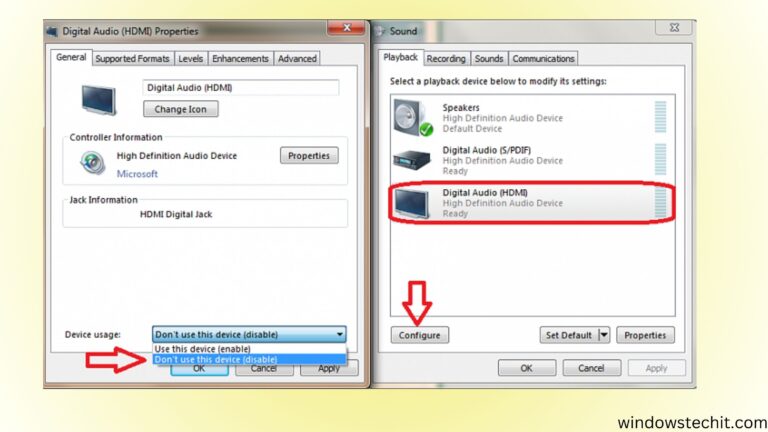
If you are experiencing the Samsung monitor no sound HDMI problem, many others are too. Many users connect their laptop, PC, gaming console, or streaming device to a Samsung monitor through HDMI only to find that video works but audio does not. In most cases, this issue occurs because the HDMI audio output device is…

Most popular posts
Windows 11 is Microsoft’s latest operating system featuring the Copilot AI assistant, Snap Layouts, a redesigned Start menu, passkey support, Smart App Control, enhanced Microsoft Defender security, live captions, Phone Link integration, and Dev Home tools—built for modern productivity, creativity, and protection on compatible PCs.
Fix Windows Error Codes and Find Solutions
Windows 11 Error Codes: What They Mean & How to Fix Them
Windows 11 is a powerful operating system, but even on the latest versions — 24H2 and 25H2 — users regularly run into cryptic error codes that interrupt their workflow.
Whether it’s a failed update, a boot problem, or a driver conflict, knowing what these codes mean is the first step to getting back on track.
The most frequently reported Windows Update errors include 0x80070002 a missing or corrupt file, an access permissions failure, and driver-related errors under the 0xC1900101 family.
In early 2026, Microsoft’s February cumulative update KB5077181 triggered a fresh wave of installation failures, with users reporting errors such as these0x80073712 across community forums.
Separately, updates released from January 2026 onward caused some applications to freeze or behave unexpectedly when reading or saving files to cloud storage services like OneDrive or Dropbox.
Boot-level errors like 0xc000000f these 0xc0000185 are also common, typically pointing to a corrupted Boot Configuration Data file or a failing storage connection—issues that require recovery tools rather than a simple restart.
When it comes to finding solutions, Microsoft Learn remains the most authoritative source for looking up specific error codes, while built-in tools like Event Viewer, the Windows Update Troubleshooter, SFC, and DISM can diagnose and resolve many common problems without needing external support.
For quick answers, Microsoft Copilot can now explain error codes in plain language and walk you through fix steps directly.
On our blog, we break down each error code in detail — covering what triggers it, how to identify it in Event Viewer, and the exact steps to resolve it, from restarting background services to applying the right cumulative update.
If Windows is giving you trouble, our guides are written to get you fixed fast.
Boost Your PC – Fix Windows 11 Error 0xc004f211 Quickly
The 0xc004f211 error code is a common Windows activation issue that users encounter when attempting to activate their operating system. This error, often accompanied by the message “Windows reported that the hardware has changed,” typically occurs due to significant hardware modifications, such as replacing the motherboard, or when the system fails to validate the product…
Top 5 Quick Solutions for Windows 11 Activation Error 0xC004F213
The 0xc004f213 error is a common Windows activation issue that users encounter, particularly during the setup or upgrade process on Windows 11 or Windows 10. This error, often accompanied by the message “Windows reported that no product key was found on your device. Error code: 0xc004f213”, indicates that the system cannot locate a valid product…
5 Effective Methods to Overcome 0xC004C003 in Windows 11
Encountering the 0xc004c003 Windows 11 activation error can be a frustrating experience, especially when upgrading or setting up your system. This error code, which also appears in Windows 10 activation error code 0xc004c003, typically indicates an issue with your product key or licensing. Whether you’re using 0xc004c003 Windows 11 Pro or 0xc004c003 Windows 11 Enterprise,…
5 Powerful Solutions to 0x800f0922 Update Error
Error 0x800f0922 is a common issue that users encounter during Windows updates on both Windows 10 and Windows 11. This error typically arises when either the update could not be downloaded or installed correctly, preventing the system from receiving important updates. Recognizing the primary causes and associated problems of this error is crucial for efficient…
3 Common Problems causing 0x80070490 and Their Solutions
Windows 11 users have recently encountered an unexpected hurdle with the popular TranslucentTB app, facing a perplexing error code 0x80070490. This issue has left many scratching their heads, wondering why a Microsoft Store app would suddenly stop functioning. Let’s dive into this problem and explore potential solutions. Troubleshooting TranslucentTB: 0x80070490 Error in Windows 11 TranslucentTB,…
Troubleshooting Windows 11 24H2 Upgrade Failures
Windows 11 brought stricter hardware requirements compared to its predecessor, leaving many users with capable but technically unsupported systems in a tricky situation. One such error that has been plaguing many Windows 11 users is the dreaded 0x80888002 error code when trying to install the 22H2 update. If you’ve been banging your head against the…
HDMI Issues on Windows 11? Here’s What to Know
HDMI problems are among the most frustrating everyday issues Windows 11 users face—from monitors not being detected at all to no sound through a connected TV to a display stuck at the wrong resolution. The good news is that most of these issues trace back to a handful of common causes and can be resolved without any specialist help.
The most frequent culprits are outdated or missing display drivers, incorrect display settings, faulty or low-quality HDMI cables, and Windows not properly recognizing a second screen after an update. Since late 2025 and into 2026, several cumulative updates have also introduced temporary display and audio routing regressions that caught many users off guard—particularly those using HDMI audio output to a TV or soundbar.
When troubleshooting, the first steps are always to check your cable and port, update your graphics driver through Device Manager or your GPU manufacturer’s site, and verify your display and audio output settings under Windows Settings. Running the built-in Display Troubleshooter can also surface issues Windows has already detected. For persistent problems, rolling back a recent Windows update or reinstalling the display adapter driver from scratch tends to resolve the majority of remaining cases.
On our blog, we walk through every common HDMI scenario in detail — no-signal errors, audio not working, resolution problems, multi-monitor detection failures, and more — with clear step-by-step fixes for each one.
A Comprehensive Guide to Video Output Settings
Video output settings play a crucial role in determining the quality and performance of videos, whether…
5 Incredible Benefits of Samsung TV HDMI Ports
HDMI (High-Definition Multimedia Interface) ports have become an essential feature in modern televisions, and Samsung TVs…
6 Strong Solutions to Monitor No Sound HDMI Problems
Having no sound from your monitor when connected via HDMI can be frustrating. Fortunately, there are…
5 Steps to Fix DELL Monitor Has No Sound Through HDMI
Many Dell monitor users face issues with Dell monitor audio not working, which can be frustrating,…
Fix Acer Monitor Has No sound through HDMI – 10 Solutions
Experiencing an Acer monitor no-sound issue can frustrate you, especially when your workflow or entertainment is…
Simple Way to listen Sound through Multiple Audio Outputs in Windows 11
Windows 11 provides flexible options for routing audio to multiple outputs simultaneously. You can direct sound…
Fix HP Monitor has No Sound When Connected to Laptop/PC
Connecting your HP monitor to a computer using an HDMI cable should transmit both video and…
How to Fix Acer Laptop Speakers Not Working?
Discovering that your Acer laptop speakers suddenly stopped working can be incredibly frustrating. However, the issue…
How to Fix Digital HDMI Audio Issues?
Connecting your home theater equipment with HDMI cables should provide pristine, uncompressed digital audio quality. But…
Everything You Need —
Totally Free
WindowsTech is your go-to resource for everything Windows and modern technology.
Explore in-depth guides on Windows 10 and Windows 11 setup, troubleshooting, and customization, alongside reviews of the best productivity software, security tools, and browser extensions.
From fixing common PC errors and optimizing system performance to understanding Copilot AI features, BitLocker encryption, and privacy settings, our tutorials are written for everyday users and small businesses.
You’ll also find honest comparisons of laptops, cloud storage providers, VPN services, and lifetime software deals, plus the latest news on Microsoft updates, cybersecurity threats, and emerging tech trends — all in plain, jargon-free language.